I really can't believe my morning. Arising before the sun (not too hard this time of year), James and I got to pray together. A quick peak on Facebook, which I usually wait until after my Bible reading, revealed what was painting the skies-NORTHERN LIGHTS. Thankful, I put a rug outside and we sat near each other and watched the dancing. It wasn't as colorful, but active. James saw a shooting star.
Talking with James about Max's 13th birthday, I just love this month. He gets to celebrate right before Thanksgiving.
Reading about God's miracle of rising Lazarus from the dead (to show His glory), I am reminded of His empathy with hurting people before he chose to resurrect him, as he was moved with tears. *I have a Aunt Linda who is soon to be with the Lord, a dear pastor friend Mr. Jim Eller who is near as well to his finishing on earth.
Then a quick No More Trouble Zone workout made my lungs happy not to be running in the cold as I am still fighting a cold.
A quick request from my daughter for a library book, I discovered...MY LIBRARIES MERGED! YES, all of the books from Anchorage to Juneau to Willow to Sutton can all be hand delivered to PALMER PUBLIC LIBRARY. I love going to Mat-Su college weekly to pick up my Anchorage books, but now, that I can swing by and pick up my books 2 miles away! Sweet!!! That means that 800,000 books available for the Mat-Su borough just increased to 1.8 million~ Did I tell you I am rich. Yes in spiritual things yesterday, now in books too!
*It also means, that the great Anchorage system of renewing books will be available online all the time. Quick email notices when things are going to be due. I love the Anchorage online system. Now, it is here in Palmer, AK.
Wow! I better start school.
Showing posts with label books. Show all posts
Tuesday, November 4, 2014
Monday, March 3, 2014
Book Sorting, Buying, and Wishing Help is right around the corner...Actually right NOW!
I love Tapestry of Grace. It is full of great books. However, I can't afford all of them. Thankfully, I utilize the library all year long for the majority of our books. However, since my little secret is out (Tapestry is GREAT), other wonderful homeschool moms are using the library. I don't want to get into a battle of the books, so I need to have on my shelf the literature books (because those are dependent on the worksheets). I also would like to have the history books that are used for more than 4 weeks.
Confession again, I had a little bit of book money to start stocking up on the books for next year. I love looking at used Amazon.com or the quaint little bookstore called Fireside Books in Palmer, but in the first week of shopping---I ORDERED THE SAME BOOK TWICE! In the past, I also have ordered a book that was already on my nice little shelf.
Not again.
I read reviews, blogs, and customer comments, and decided I was going to put my smart-phone to work (an ipad will do the thing as well). I bought "Book Crawler". This app allows me to scan the barcode on the back of the book or manually enter in my older books. Then it is not only searchable, but my entire library is in my grubby little hands if I am tempted to "repurchase" a good deal at the local thrift store.
Reality, it takes about 1 hour per large bookshelf to enter in the books. It was painless. I learned to make sure to "tick" or select the slide key called OWN when you scan a book. Then it places a nifty little check mark by the books I own.
I also can enter my next years books. I just don't mark OWN. Also, I can add a custom category on a book. For example, I added a category called TOG 1 (for Tapestry of Grace year 1) or you could add Son 3(for Sonlight grade 3).
You also can push this little blue button on any book that you entered and it will automatically tell you if it is in a library close by. With another click, you can place the book on hold. Yes, it is that simple.
To use between two devices (iphone/ipad) I just signed up for dropbox and then push a button and my database is shared. So, if I am done, I export my database (one button while online). Then when I open the app on a different device I "import" my database. That way I don't ever loose my books, and I have the same list of books I am working with. They "Book Crawler" just opened a desktop app to work online as well.
I love sharing books. When you open a specific book, you can also tick a LOAN button and type in the person you loaned it to. I love that.
Hopefully, I will be able to not purchase the same book twice, know what I need with a click of the button, and be able to share my books and not wonder who I loaned it to.
Confession again, I had a little bit of book money to start stocking up on the books for next year. I love looking at used Amazon.com or the quaint little bookstore called Fireside Books in Palmer, but in the first week of shopping---I ORDERED THE SAME BOOK TWICE! In the past, I also have ordered a book that was already on my nice little shelf.
Not again.
I read reviews, blogs, and customer comments, and decided I was going to put my smart-phone to work (an ipad will do the thing as well). I bought "Book Crawler". This app allows me to scan the barcode on the back of the book or manually enter in my older books. Then it is not only searchable, but my entire library is in my grubby little hands if I am tempted to "repurchase" a good deal at the local thrift store.
Reality, it takes about 1 hour per large bookshelf to enter in the books. It was painless. I learned to make sure to "tick" or select the slide key called OWN when you scan a book. Then it places a nifty little check mark by the books I own.
I also can enter my next years books. I just don't mark OWN. Also, I can add a custom category on a book. For example, I added a category called TOG 1 (for Tapestry of Grace year 1) or you could add Son 3(for Sonlight grade 3).
You also can push this little blue button on any book that you entered and it will automatically tell you if it is in a library close by. With another click, you can place the book on hold. Yes, it is that simple.
To use between two devices (iphone/ipad) I just signed up for dropbox and then push a button and my database is shared. So, if I am done, I export my database (one button while online). Then when I open the app on a different device I "import" my database. That way I don't ever loose my books, and I have the same list of books I am working with. They "Book Crawler" just opened a desktop app to work online as well.
I love sharing books. When you open a specific book, you can also tick a LOAN button and type in the person you loaned it to. I love that.
Hopefully, I will be able to not purchase the same book twice, know what I need with a click of the button, and be able to share my books and not wonder who I loaned it to.
Thursday, August 2, 2012
Oh no, it's Monday. How to begin your week with Tapestry of Grace
Every year and even each quater might look a bit different, but I wanted to share how it looked like on the average week. We love the freedom Tapestry of Grace gives.
We begin by spending some time in the Word and having the children journal the journey. I really like to have the children share what they observe in the Bible instead of telling them what I think it says.
Then we go to the Kitchen Table
I have the student open up their working notebooks on the kitchen table.
Cocoa Time on Friday. (later post)
Thats how we play our week of Tapestry of Grace. How do you plan yours?
Then we go to the Kitchen Table
I have the student open up their working notebooks on the kitchen table.
- Read the page Weekly Overview
- hand out the books and have them highlight the books that are required reading for that week.
- I may adjust and add more or less depending on the "load" of that week or if the student has finished early a "required reading" they could "choose their own title."
- Have the children pick out their activity for the week (or choose for them). Looking at each week, I sway their choices. They might need to take two or three weeks for one activity, but if they choose it they will love it more. Some activities are vetoed by me because of weather or cost. However, most are easy to pull off and my children remember the fun things.
- We then go over vocabulary for comprehension and sometimes add it to their spelling list (later post)
- Introduce the writing for the week and give them a deadline for 1st, 2nd and final draft. I choose to combine Writing Aids with Institute of Excellence of Writing. (I will explain writing in detail later)
- Then they are off...
- I use a White Board with the weekly disciplines with a Sharpie but a dry erase of their initials. When they finish a discipline, they show me the work and then they can erase their initial.
Cocoa Time on Friday. (later post)
Thats how we play our week of Tapestry of Grace. How do you plan yours?
Tuesday, July 17, 2012
How to Set Up Tapestry of Grace for the year PART ONE BOOKS
Well, it is how I set up Tapestry of Grace BOOKS.
1) You must purchase Tapestry of Grace. I am using year 2, so that is the link, but you can do any year at any time.
Tapestry of Grace Year 2 Digital Version
2) Books...
I know this is the major part. When I lived in Africa, I just bought all my books because the libraries didn't know what they had and the majority of the time it was chaos. However, now that I am in USA, I use my books that I have, friends, library, used bookstores, kindle/nook, then I buy some books. This year I will be buying two books. Yes! Just TWO BOOKS.
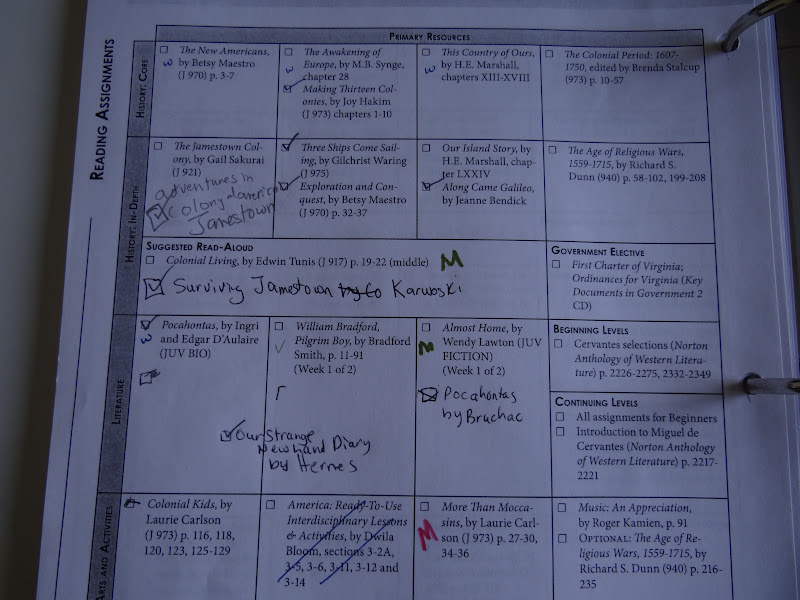
I begin by printing out the primary resources and alternative resource pages from the Tapestry of Grace pages.
I place them in a notebook that is a TOG year 2 working notebook.
Then I see if I have any books- I put a check if I do on either the primary or Alternate resources. Or if I don't want a certain book, I cross it out. *there is only two books that we don't like in the Tapestry books so far (America:ready to us Interdisciplinary Lessons and With Pipe Paddle and Song)
I see if my friends have any books. If they do I put their initial beside the book and gather them prior to the start of school.
Fun part (for me at least), I can search two major library districts and I find if they have first the primary and only the alternate if I am missing a book in the primary resources.
For example: If I needed for Dialectic Literature book "Almost Home" by Lawton and the library didn't have it, I would look up the alternate resource "The double Life of Pocahontas" by Fritz. I won't have a worksheet for the alternate but, it would cover the time period or the person I was studying.
I then mark on my TOG book notebook beside the book an initial of the library so that I know where I need to request the book from or put it on hold. Our library has a 30 day checkout period and a two week hold, so I can request way in advance for the books I need. One weekly trip is all that is needed.
*Look also for the audio or downloadable e-books as well. If you child gets a break from reading and can listen to the book. How fun is that!
Then I go through each week, and see if I have any holes. The major holes I look for is literature because TOG has great interactive sheets for the specific books. Then I look if I need any history books that is not covered in the primary or alternate resource. I write in the working notebook my alternate book that I want the children to read. (Very important or you will not remember that you have a different book and you won't ask your child to read it that week)
However, if I see that UG has a book on Jamestown, and LG doesn't I will just let my younger daughter listen to some of Max's book. Second, I then see if there is any other books at the library that will cover the subject. "You wouldn't want to be a ..." series is fun and they are so new that TOG might not of used them because I have been using TOG for 5 years.
Then I type out a list of the still needed books. This year I created a spreadsheet of the books and then did a cost of purchasing these books (amazon, Bookstore central). I kept that little list around when I went to second hand stores or garage sales. I found about 4 or 5 titles for .25 cents a piece!
Now, it is almost time to purchase the needed 23 books. But read on to find out why Palmer Public Library is the BEST.
AMAZING: This year I had about 23 books that I couldn't find, for LG, UG, and D. I went and filled out a "book request form" at the local library. They ordered EVERYONE!
I put my books in order from which week and unit on 4 shelves. So, Unit 1 first shelf, Unit 2, second shelf, etc.
I also order them by weeks so I won't need to search the house for them. (biggest pain). After the school year is over, I make sure these books are around the home so that the children can re-read them. But, not the current year.
This is getting to long. Part II will come out later.
1) You must purchase Tapestry of Grace. I am using year 2, so that is the link, but you can do any year at any time.
Tapestry of Grace Year 2 Digital Version
2) Books...
I know this is the major part. When I lived in Africa, I just bought all my books because the libraries didn't know what they had and the majority of the time it was chaos. However, now that I am in USA, I use my books that I have, friends, library, used bookstores, kindle/nook, then I buy some books. This year I will be buying two books. Yes! Just TWO BOOKS.
I begin by printing out the primary resources and alternative resource pages from the Tapestry of Grace pages.
I place them in a notebook that is a TOG year 2 working notebook.
Then I see if I have any books- I put a check if I do on either the primary or Alternate resources. Or if I don't want a certain book, I cross it out. *there is only two books that we don't like in the Tapestry books so far (America:ready to us Interdisciplinary Lessons and With Pipe Paddle and Song)
I see if my friends have any books. If they do I put their initial beside the book and gather them prior to the start of school.
Fun part (for me at least), I can search two major library districts and I find if they have first the primary and only the alternate if I am missing a book in the primary resources.
For example: If I needed for Dialectic Literature book "Almost Home" by Lawton and the library didn't have it, I would look up the alternate resource "The double Life of Pocahontas" by Fritz. I won't have a worksheet for the alternate but, it would cover the time period or the person I was studying.
I then mark on my TOG book notebook beside the book an initial of the library so that I know where I need to request the book from or put it on hold. Our library has a 30 day checkout period and a two week hold, so I can request way in advance for the books I need. One weekly trip is all that is needed.
*Look also for the audio or downloadable e-books as well. If you child gets a break from reading and can listen to the book. How fun is that!
Then I go through each week, and see if I have any holes. The major holes I look for is literature because TOG has great interactive sheets for the specific books. Then I look if I need any history books that is not covered in the primary or alternate resource. I write in the working notebook my alternate book that I want the children to read. (Very important or you will not remember that you have a different book and you won't ask your child to read it that week)
However, if I see that UG has a book on Jamestown, and LG doesn't I will just let my younger daughter listen to some of Max's book. Second, I then see if there is any other books at the library that will cover the subject. "You wouldn't want to be a ..." series is fun and they are so new that TOG might not of used them because I have been using TOG for 5 years.
Then I type out a list of the still needed books. This year I created a spreadsheet of the books and then did a cost of purchasing these books (amazon, Bookstore central). I kept that little list around when I went to second hand stores or garage sales. I found about 4 or 5 titles for .25 cents a piece!
Now, it is almost time to purchase the needed 23 books. But read on to find out why Palmer Public Library is the BEST.
AMAZING: This year I had about 23 books that I couldn't find, for LG, UG, and D. I went and filled out a "book request form" at the local library. They ordered EVERYONE!
I put my books in order from which week and unit on 4 shelves. So, Unit 1 first shelf, Unit 2, second shelf, etc.
I also order them by weeks so I won't need to search the house for them. (biggest pain). After the school year is over, I make sure these books are around the home so that the children can re-read them. But, not the current year.
This is getting to long. Part II will come out later.
Subscribe to:
Posts (Atom)